





Strategy Connection Guide

Hyper RSI Setup Guide

The full walkthrough for connecting the Hyper RSI indicator on TradingView to the MOABOT webhook.

An RSI + DCA combo strategy — split entries in oversold/overbought zones and 3-stage take-profit to manage average cost.

This guide is a reference only

All settings shown on screen are examples and do not guarantee profits. Adjust based on your capital, risk tolerance, and trading style.

MOABOT is a trading-signal automation tool, not investment advice.

Read first

Before you follow this guide

Every number on screen is an example used to demonstrate the flow. Before live trading, double-check that values match your own capital, strategy, and risk limits.

Reference Guide

This document is a reference for learning how to use MOABOT. Following the same settings will not produce the same results.

Use Your Own Settings

The example values are only a starting point. Adjust inputs to fit your capital, trading timeframe, and risk tolerance.

No Profit Guarantee

Backtest results based on past data do not guarantee future profits. Always consider the possibility of loss.

You Are Responsible

Exchange API permissions, fund management, and alert-setup accuracy are all the user's responsibility. If in doubt, validate with a small amount first.

Spot Funding Notice

Spot has no leverage — you need enough capital

Minimum Order Size

Exchange Policy

Each coin has its own minimum lot size (e.g. BTC 0.0001) and minimum order amount — differs by exchange.

3-Stage Take Profit

TP1 / TP2 / TP3

Hyper RSI splits take-profit into 3 stages. Each stage must clear the exchange minimum to work properly.

Korean Exchange Standard

Min ~16,000 KRW per TP cycle

Upbit / Bithumb policy requires ~5,000 KRW per order. To complete a 3-stage TP cycle, ~16,000 KRW or more should sit on the TP lines.

This is exchange policy — not something MOABOT can control

If TP orders are rejected due to insufficient funds, position cleanup will not happen correctly. Before starting, verify that your capital can fully cover a 3-stage TP cycle.

Overseas exchanges (OKX / Binance / Bybit / Bitget) also have per-coin minimum order amounts (typically 5–10 USDT). Korean exchanges are stricter.

Input Reference

Indicator inputs — meaning and recommended starting values

Definitions and example starting values for every field. All values are starting points — adjust based on your own capital and trading style.

A

Auto-trade window / Direction

Defines when the indicator becomes active and the trading direction. Start time must be after the current moment, or back-fired fake signals can fire.

Auto-trade start time

e.g. 2025-11-01 00:00 (after now)

Auto-trade end time

Set far in the future (e.g. 2121-01-01)

Direction

  • Long (buy)
  • Short (sell)
  • Both (long + short)

Spot supports long-only. Both / short are for futures accounts.
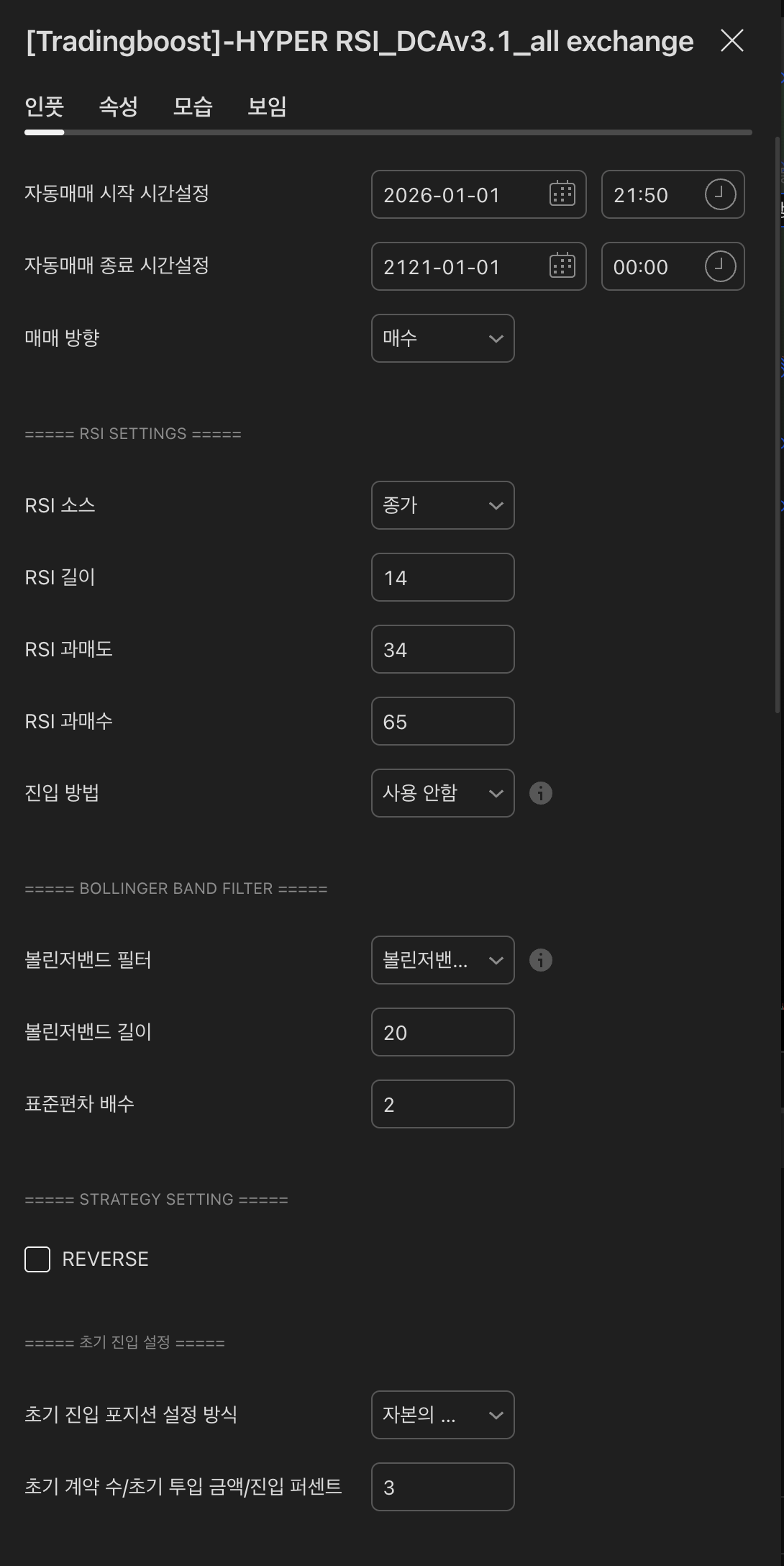
HYPER RSI 인풋 — Auto-trade window / Direction
Actual indicator settings screen
B

RSI source / Length / Oversold·Overbought

The RSI calculation base used as the entry trigger. "Source" chooses which candle price feeds the RSI.

RSI source

  • Close (recommended)
  • Open / High / Low
  • (H+L)/2, (H+L+C)/3, etc.

RSI length

Default 14. Shorter = more signals + more noise.

RSI oversold

e.g. 33. Lower = more conservative entries.

RSI overbought

e.g. 68. Used as a take-profit reference.

HYPER RSI 인풋 — RSI source / Length / Oversold·Overbought
Actual indicator settings screen
C

Entry method + Bollinger Band filter

Decides when to actually enter after RSI conditions are met, and whether Bollinger Bands work as an extra filter.

When both RSI and Bollinger filters are ON, entry requires both conditions at once.

Entry method

  • Breakout (first cross of the RSI line)
  • Inflection (direction flip)
  • Inflection breakout (flip then opposite cross)

Bollinger Band filter

  • Disabled
  • Upper/Lower (inside/outside band)
  • Upper/Lower touch
  • Breakout / Inflection / Inflection breakout

Bollinger length

Default 20

Standard deviation multiplier

Default 2 (band width)

HYPER RSI 인풋 — Entry method + Bollinger Band filter
Actual indicator settings screen
D

Initial entry (1st entry)

How much you enter on the first signal. Always check each exchange's minimum lot size and minimum order amount first.

※ Minimum contract size differs per coin. Check your exchange's market info for the minimum lot size (BTC: 0.0001, etc.) and minimum order amount.

Initial entry sizing method

  • % of capital
  • Contracts / Quantity
  • Amount (USDT)

Initial contracts / amount / percent

e.g. 0.75% of capital — conservative starting point

HYPER RSI 인풋 — Initial entry (1st entry)
Actual indicator settings screen
E

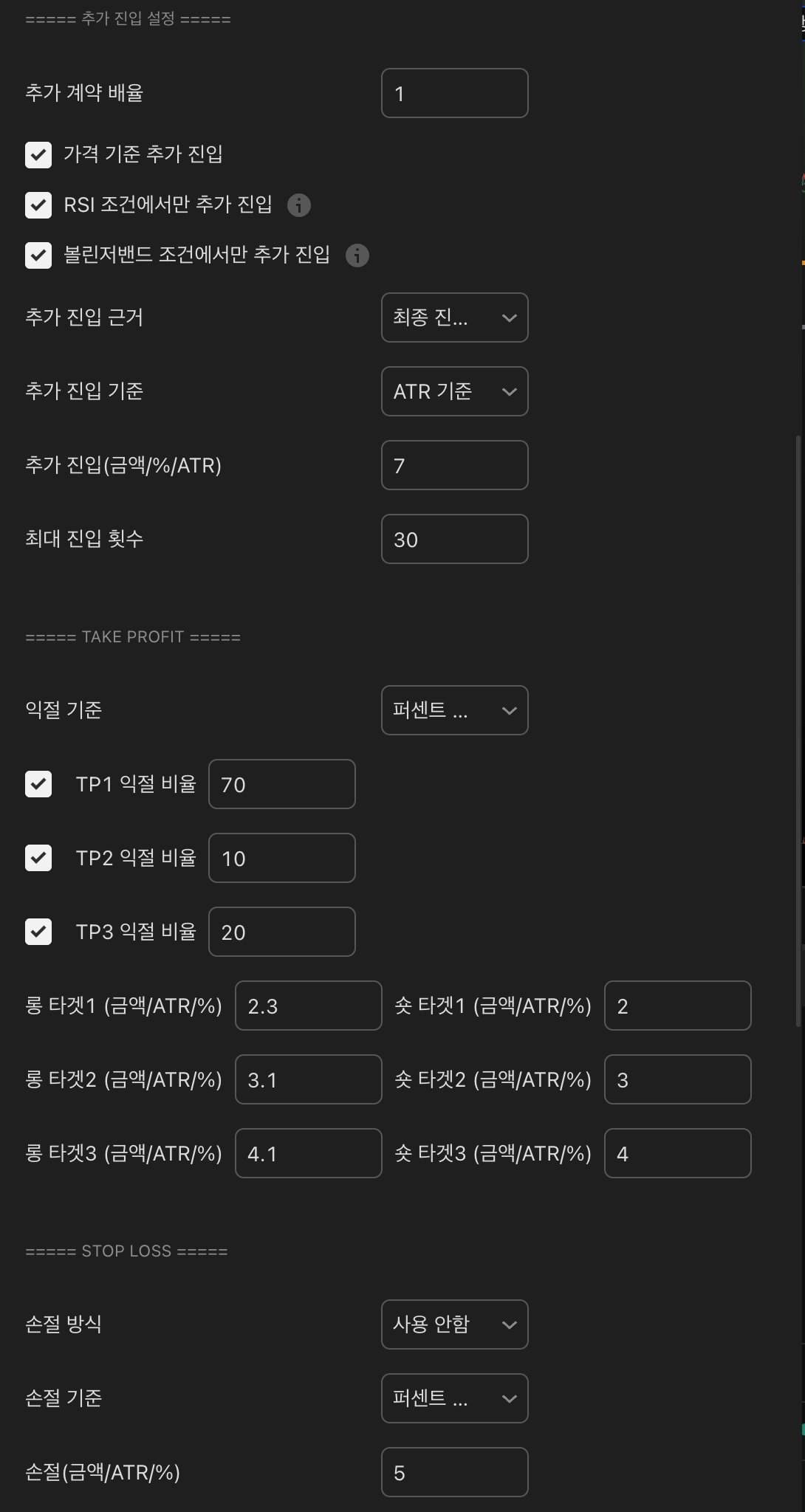
Additional entries (DCA) — split buying

After the first entry, if the market moves against you, this configures how to lower the average price with split buys.

DCA contract multiplier

e.g. 1.6 — each step buys 1.6x the previous step

DCA trigger basis

  • Price
  • RSI oversold/overbought only
  • Bollinger condition only

DCA reference price

  • Average price
  • Last entry price

DCA gap

  • Amount-based
  • Percent-based
  • ATR-based

Maximum entries

e.g. 7 (including 1st — so DCA count is 6)

HYPER RSI 인풋 — Additional entries (DCA) — split buying
Actual indicator settings screen
F

Take profit (TP1 / TP2 / TP3)

The basis for splitting position exit. The 3-stage take-profit percentages must sum to 100.

※ Each TP slice must clear the exchange's minimum lot size (e.g. BTC 0.0001). Insufficient funds cause TP to be rejected.

TP basis

  • Amount (USDT)
  • Percent (%)
  • ATR

TP1 / TP2 / TP3 ratio

e.g. 70 / 10 / 20 — sum = 100

Long / Short targets 1·2·3

Price distance for each target (e.g. ATR 2.3 / 3.1 / 4.1)

HYPER RSI 인풋 — Take profit (TP1 / TP2 / TP3)
Actual indicator settings screen
G

Stop loss / Break-even / Trailing stop

Risk management options. Start conservatively and adjust once you understand the behavior.

Stop loss mode

  • Disabled (default)
  • Stop on average price
  • Stop on last entry price

Stop loss basis

  • Amount
  • Percent
  • ATR

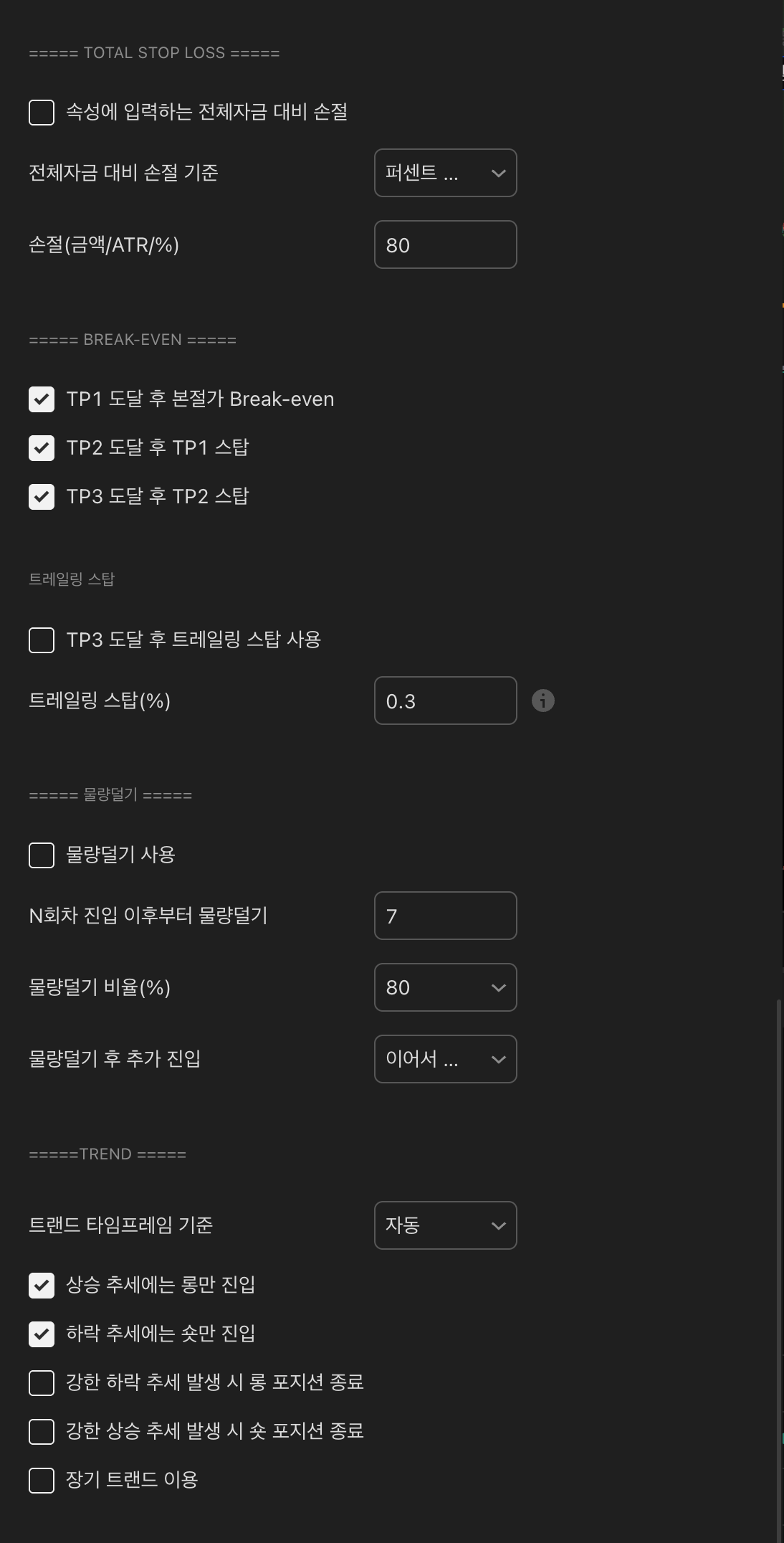
Break-even

  • Move stop to break-even after TP1
  • Move stop to TP1 after TP2
  • Move stop to TP2 after TP3

Trailing stop

After TP3, trail-stop remaining size (e.g. 0.4%)

HYPER RSI 인풋 — Stop loss / Break-even / Trailing stop
Actual indicator settings screen
H

Position lightening + Trend filter

How to handle leftover size when entries reach high steps, and trend-based filter options.

Position lightening

At a target step, clear a portion (e.g. clear 80% at step 7)

After lightening

  • Continue DCA from where it was
  • Restart from step 1

Trend options

  • Uptrend — long only
  • Downtrend — short only
  • Exit on strong counter-trend
  • Long-term trend (4H reference)
HYPER RSI 인풋 — Position lightening + Trend filter
Actual indicator settings screen
I

Add-on options + Consecutive-entry filter

Re-entry policy, on-chart status table, and consecutive-signal filtering.

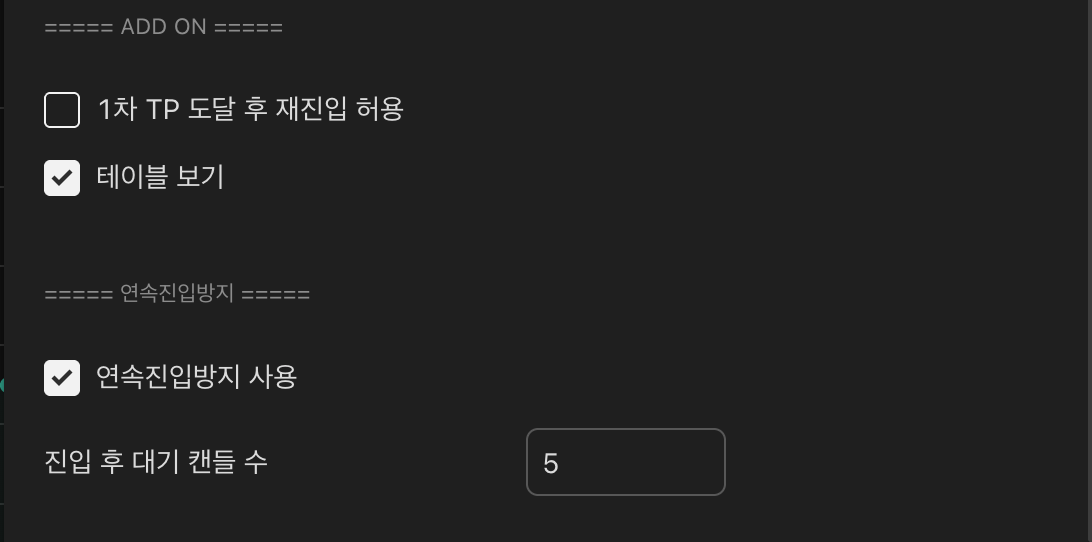
ADD ON

  • Allow re-entry after TP1
  • Show table (chart top-right status panel)

Consecutive-entry block

Ignore signals for N candles after entry.

Cool-down candle count

e.g. 5 — wait 5 candles for the next signal.

HYPER RSI 인풋 — Add-on options + Consecutive-entry filter
Actual indicator settings screen
J

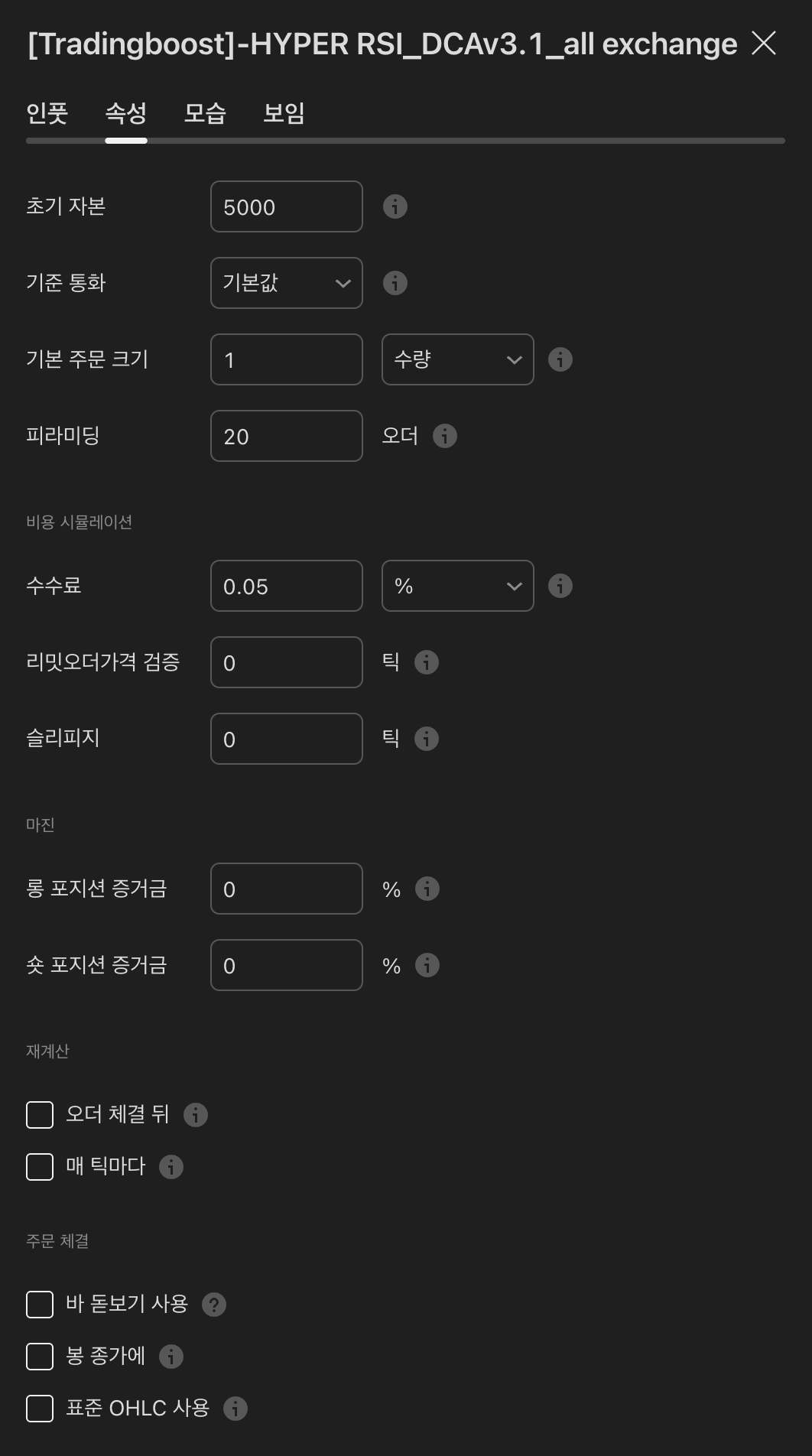
Properties tab — Initial capital / Commission

Separately from the Inputs tab, the "Properties" tab is where the backtest / simulation capital and trade fee live. Do not touch other fields here — the indicator can misbehave.

※ Do not modify Base currency / Order size / Pyramiding / Slippage / Margin / Recalculation / Fill assumption.

Initial capital

Actual amount you will trade (USDT or KRW equivalent)

Commission

Exchange spot fee rate — typically 0.05–0.1%

HYPER RSI 인풋 — Properties tab — Initial capital / Commission
Actual indicator settings screen

Next

Check active alerts in the webhook dashboard

Once setup is complete, the MOABOT webhook dashboard shows incoming signals and order results in real time.

Go to Webhook Dashboard
Support